

Private Regions overview
Private Regions are regions in Second Life that are directly paid for and controlled by a Resident.
In general, Private Region ownership is an excellent choice for Residents who:
- Wish to enjoy land ownership separate from the ever-changing Second Life mainland.
- Want to build and control a Second Life experience with or without adjacent neighbors.
- Require more land controls than those provided on the mainland.
- Want to name the region their land is in (within the naming guidelines).
| Tip |
| To find out who owns a particular region, select World > Place Profile > Estate and locate the listing for Owner. If the owner is listed as (nobody), the region is owned by Linden Lab and is considered mainland. |
Estates versus Private Regions
An estate is an administrative container for regions, much like a country in real life controls a specific piece of land or territory. Estates can have as few as one region or as many as thousands of regions within them. The main advantage to having many regions in the same estate is to allow the same group of Estate Managers to have administrative power in them, like controlling ban lists, managing parcels, or adjusting settings.
Estates having control over regions is similar to the idea of a country controlling different land areas in real life. In some ways, estates act like a country's government and control the land regions inside the country's possession. Some countries have many regions in them (like America with its states, or France's administrative régions), while other countries are small and have only one region in them.
- For example, Barbados is a single island (region) that is also a country (estate).
- Compare that to Indonesia, which is made up of 17,504 islands (regions) in a single country (estate).
- In these examples, the islands in the countries share common laws, currency, and government officials -- much like the different regions in an estate share an owner, estate managers, and selected settings like access.
Other important notes about estates:
- A Resident can own many estates.
- An estate can never have less than one region.
- All regions in the same estate share the same owner; ownership (and who pays for the region maintenance) is always determined by the estate a region is in.
Regions in the same estate share certain common settings, including but not limited to:
- Ban lists
- Estate managers
Region Maintenance Fees
Private region maintenance is charged on a monthly basis (except in the case of some special regions, like educator or non-profit regions operated by schools, charities or businesses). The region's maintenance fee is automatically charged to your account much like a Premium membership would be.
To check when your private region maintenance fee will be charged to your account, visit secondlife.com and log in to your account.
- On the default Account Dashboard page, click the Land Manager link in the left column.
- Select My Regions
- Click on the Estate name for the region you'd like to review
- Your region's next billing date will be listed next to the region name
If you have a positive Tilia Account credit from selling Linden Dollars or other transactions, your region maintenance fee will be deducted from your account credit. Any remaining balance due will be charged to the method of payment on file that you've selected for recurring fees.
For more information about associating payment methods with different types of Second Life transactions, please see our Billing article.
Region maintenance fees by type
| Region Type | Setup Fee (USD$) | Monthly Maintenance Fee (USD$) |
|---|---|---|
| Full Region | $349 | $209 |
| Homestead Region | $149 | $109 |
| Openspace Region | $99 | $60 |
| Skill Gaming Region | $600 | $345 |
| Skill Gaming Elite Region | $699 | $599 |
| Event Region Pro | None | $449 |
| Event Region Elite | None | $599 |
The setup fee for a new region includes its first month of maintenance fees. Event Region Pro and Event Region Elite regions have no setup fee, but for new regions the first monthly maintenance fee will be charged on region creation. Existing regions that are upgraded to an Event Pro or Event Elite region will bill at the new monthly maintenance rate on their next regular billing day.
Skill gaming regions are available to approved Skill Gaming Operators only. See Skill Gaming regions for more information.
You may also choose to convert one or more of your Private Regions into multiple Openspaces or Homesteads, or you may choose to convert some of your Openspaces or Homesteads to different region types. After any conversion, you must always have at least one standard Private Region remaining. For full details on converting between different region types, see Converting Private Regions.
Private Region types
Undeveloped regions are delivered completely empty of objects and ready to be built and shaped to your liking.
The table below explains some of the different types of Private Regions available for purchase in the Second Life® virtual world.
In addition to the standard types below, there are also specialized region types available for events and skill gaming.
| Full Regions | Homestead Regions | Openspace Regions | |
|---|---|---|---|
| Description | Our flagship region product which offers the greatest flexibility in performance and capacity. | Lower capacity than a Full Region; intended for quiet residential or light commercial use. Available for Full Region owners & Premium Plus only. | Intended for scenic use such as ocean, forest, or parks. Available for purchase by support ticket only. |
| Size | 65,536 m2 | 65,536 m2 | 65,536 m2 |
| Setup fee |
US$349 |
US$149 |
US$99 |
| Monthly maintenance | US$209 | US$109 | US$60 |
| Land capacity | 20,000 | 5,000 | 1000 |
| Max. avatars | 100 | 20 | 10 |
| Habitation allowed? | Yes | Yes | No |
| Rental allowed? | Yes | Yes | No |
| Events & classifieds? | Yes | Yes | No |
| Conversion to Full Region allowed? | N/A | Yes | Yes |
Additional types of Private Regions
In addition to standard Full Private Regions, existing region owners (and Premium Plus members, for a single homestead region specifically) may purchase other types of regions designed for specific types of activity and usage: event regions, skill gaming regions, homestead regions, and openspace regions.
Event Regions
Event Regions are a special type of region with extra capacity for both visitors and objects, depending on the package chosen, as well as other benefits specifically aimed at making large gatherings of avatars possible. To make this additional capacity possible, Event Regions run on a special hardware configuration.
Event Regions are available in two configurations, Event Region Pro and Event Region Elite.
Event Region Pro
The Pro configuration for Event Regions offers support for larger groups of avatars to be present in the region simultaneously with more capacity for scripts and an optional extended chat range to allow for all visitors to take part in events without the need to crowd into a smaller space. Additional services for special events (including an increase in land impact capacity and cloning of event regions) are available as a separate fee if desired.
Existing full regions can be upgraded to an Event Region Pro with no additional setup fee; the monthly maintenance fee for the selected region would increase to USD$449 on its next monthly billing.
Event Region Pro Specifications
- Land impact capacity: 20,000 (upgradeable)
- Avatar Limit: 175
- Extended chat range (on request)
-
Available Cloning of Event Region - USD $50
- 100% original content only
-
Price: USD $449 per month
- No additional setup fee required; for new regions, the monthly maintenance of USD$449 is charged when the region is created
Event Region Elite
The Elite configuration for Event Regions includes the features of Event Region Pro but adds additional services as an all-inclusive option, for those who operate frequently recurring high profile events that require more active maintenance than an Event Pro Region configuration allows.
Event Region Elite Specifications
- Land impact capacity: 30,000
- Avatar Limit: 175
- Extended chat range (on request)
- Event Region Cloning (100% original content only)
- No fees for Region Rollbacks
-
Price: USD $599 per month
- No additional setup fee required; for new regions, the monthly maintenance of USD$599 is charged when the region is created
Ordering an Event Region
To order an Event Region, please submit a request via our support ticket system.
- Select Land & Region > Region Purchase
- Please include which configuration you would like for your region, Event Region Pro or Event Region Elite, as well as your preferred region name and location if you have the information available

Skill gaming regions
Skill gaming regions are regions specifically permitted to host approved skill gaming machines. They can only be purchased and owned by approved skill gaming operators. Please see the Skill Gaming FAQ for more information on skill gaming regions.
Skill gaming regions pricing
-
The setup fee for a new skill gaming region is USD$600
- This includes the first month of region maintenance (USD$345)
- Skill Gaming Regions (Standard Full): USD$345 per month
- Skill Gaming Regions (Upgraded 30k Capacity): USD$375 per month
-
Skill Gaming Elite regions: USD$599 per month
- Skill Gaming Elite regions have an increased avatar limit of 175 and an increased land impact of 30,000 included.
- Upgrading an existing Skill Gaming region to a Skill Gaming Elite region costs $99 USD (the difference between the setup fees).
Homestead Regions
|
A Homestead is a type of Private Region intended for such purposes as:
Other specifications for Homesteads include:
Pricing for Homesteads is as follows:
|
 |
Land parcels on Homestead Regions
Homesteads are approved for rental use within the Region limitations we have set.
Openspace Regions
Openspace Regions are a type of Private Region intended for light use such as water, hills, or forest. They are not intended for building, home rentals, or events. To own an Openspace Region, you must also own a Full Private Region.
Openspace specifications include:
- Available to full region owners only
- Lower price than a full region or Homestead
- Events and classifieds are not permitted
-
Comes with lower usage limits than full regions or Homesteads:
- Land capacity set at 1000
- Concurrent avatar limit set at 10
- New Openspace regions are available by support ticket only.
- Monthly fee of $60
For more information about Openspace Regions, see the article titled Openspace Regions.
Buying Private Regions
|
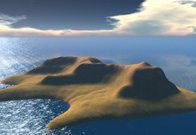
There are several ways to purchase a private region. The quickest and easiest method is to purchase a new region from our online land store, which will automatically deliver your newly purchased region right away. Existing regions can also be purchased from other Residents, who may choose to transfer their region or estate to a new owner via the support ticket process at the Support Portal. |
 |
Private Regions for Non-Profit and Educators
Educators and non-profit institutions may be eligible to purchase private regions at a discount. For more information, please see Information for educators and the Education and Non-Profit Discount Terms and Conditions.
Purchasing from the land store
Before purchasing a new region from the land store, there are a few important notes to consider:
- To purchase land from the Land Store, you must have billing information on file. Add billing information on your billing information page.
-
You can only purchase a Homestead region through the Land Store if you own or are also going to buy one or more full regions.
- Educators & non-profits have a separate purchasing website -- see Information for educators for more information.
- Premium Plus members who would like to purchase a single homestead without also owning a full region may do so by contacting our Support Team.
- Orders totaling more than US$10,000 can't be processed through the Land Store. If you're planning on buying more than US$10,000 worth of land, consider making multiple orders.
- You may have up to 10 items in your cart at once. Items don't stay in your cart forever; they stay in your cart until you or someone else buys them. A region is held as yours for 30 minutes after your last activity in the Land Store. If someone else buys it (or a neighboring region) after those 30 minutes have elapsed, it will appear in your cart as unavailable.
- Be sure your preferred region name meets the guidelines for naming private regions
When you're ready, here's how to purchase your private region at the Land Store:
- Log into the Second Life Land Portal.
- Click Buy an Undeveloped Private Region. If you don't need the amount of control and space that comes with a region, you can choose to Buy Mainland.
- You are presented with thumbnail images and descriptions of several appealing choices. These are all starting points for your creative vision, and you can always reshape your land later.
- Click Continue to proceed.
- Use the comparison details on the "Land Detail" page to decide whether you want a Full Region or Homestead. Click Choose under your selection to continue.
- On the "Name your land" page, type a name in the Create a Region Name field and click Check Availability. If your selected name is not taken, you can proceed.
- Region Coordinates are automatically filled in; these coordinates are where your Region will be physically located on the World Map. If you'd prefer to override them, click [change], then click a map square that isn't crossed out in red. You can click the arrow buttons to look at different areas on the map. You can also search for another region to be near (for example, one that a friend or colleague owns -- see Ordering adjacent regions for how that works)
- Select answers to the survey questions -- if you're not sure or prefer not to answer, the Other option is available.
- Click the Add to Cart button.
- Once all details have been successfully verified, you can shop for more regions (same steps as above) or click Proceed to Checkout.
- A summary of your region order will appear on the next page. Click Place Order to confirm your purchase.
Delivery
Once your region purchase is complete, you receive an email with the details. A new region is generally delivered within 15 minutes. Occasional service updates may affect that time, so see the Second Life Grid Status Reports page if it's taking longer than expected. You're also welcome to contact the Concierge support team at the Support Portal during business hours to check on your new region's progress.
Purchasing a private region from another Resident via region transfer
If you're interested in purchasing an existing region from another Resident, you may be able to do so by completing a region transfer through support tickets at the Support Portal. When you've found someone who wishes to sell their private region, both the buyer and seller come to an agreement on the sales price and submit tickets to initiate the transfer. Please see Transferring Private Regions for more information on this process.
If you already own a private region, and are interested in selling it to another Resident, this may also be possible. Please see Transferring Private Regions for more information.
Maturity ratings
New regions are delivered with a default maturity rating of  Moderate. You can customize this using the Region/Estate tools:
- From the Viewer menus, go to World > Place Profile > Region/Estate.
- Click the Region tab.
-
From the Rating dropdown, select either
 or
or  Adult.
- Click Apply.
 Moderate or
  Adult, only Residents, including yourself, who have set their maturity preference correctly will be able to access the region. Otherwise, if they try to enter, they'll be prompted either to set their preferences or be age-verified. See Maturity ratings for more information.
Guidelines for naming Private Regions
Follow these guidelines when naming your Private Region (island) or estate.
Private Region or estate names:
- Must not already be in use.
- Must be more than 2, but less than 26 characters (spaces count).
- Must contain three words or less.
- Must use only alphanumeric characters (no punctuation).
- Must not be the name of a real life city (however "New York Island" or "Los Angeles City" are fine).
- Cannot include SL, Linden, Linden Lab, Second Life etc in the name.
-
Must comply with General maturity rating guidelines.
Do not use the following as a Private Region name or estate name:
- The name of another person to the extent that it may cause deception or confusion.
- A name which violates any trademark right, copyright, or other proprietary right.
- A name which may mislead other users to believe you to be an employee of Linden Lab.
- A name which Linden Lab deems in its discretion to be vulgar or otherwise offensive (obscenities in any language and however spelled; language that is racist, sexist or otherwise derogatory in nature).
Linden Lab reserves the right to change Private Region and estate names as we see fit.
Ordering adjacent regions
It is possible for two people to order adjacent Private Regions. The first person must:
- Order a Private Region, then log into the Second Life website and click the Land Manager tab.
- Click the My Regions tab.
- Click the estate name of the estate for which you want to allow neighbors.
- In the Allowed Neighbors column, click the edit link for a specific region.
- Type the name of the Resident you want to allow as a neighbor, then click Add.
- Click Close.
The second person must
- Order a Private Region as described in Purchasing from the land store.
- During the ordering process, you may place your new region adjacent to the first person's region.
Private Region customizations
Initial customizations
With your region order, you can specify the following customizations:
- Name: You can select a unique name when creating the region. See the Guidelines for Private Region Naming for details.
- Terrain shape: You can select from one of the six predesigned templates (including flat green land and open water).
- Estate: You can assign your region to its own estate or to an estate you already own (with other Private Regions owned by you). Your Estate tools allow you to control settings for more than one region at once.
Additional features and controls for Private Regions and Estates
Estate owners possess a broad array of powers and options for maintaining their Private Regions and shaping them to fit their desired appearance. Many of these options can be found in the Second Life Viewer's Region/Estate window. For a more exhaustive list of management options such as region rollbacks, covenants, and terraforming tools, see Managing Private Regions.
Land parcels on your regions
Parcels can be sold to other Residents, but you remain responsible for the monthly payments. You can make arrangements for these new parcel owners to pay you for use of the estate, but that's between you and the other Residents. Many estate owners use the estate's covenant to explain their payment structure.
Renting a region for a special event
If you don't need to own a private region full time, we may be able to help! Linden Lab offers temporary Full Region rentals for events and limited time usage. Rental amounts are to be paid in full at the beginning of the rental period.
Details
- Reservations must be made 2 weeks in advance and are on a first-come first-served basis.
- Residents must include a full description of the event when applying.
- Minimal rental period is 3 days.
- Residents are allowed to terraform the land and do not incur tier fees for temporary ownership of the land.
- Residents cannot transfer the land during the rental period.
- The original state of the regions will be saved immediately before the rental period. At the conclusion of the rental period, the regions will be restored.
Rental rate
Land rental rates are different depending on whether you want to rent Private Regions or space on the mainland.
- Private Regions are US$50 per region per day.
- Mainland regions are L$4,000 per region per day.
- Mainland rental regions are Iridium, Osmium, Palladium, Platinum, Rhodium, and Ruthenium (named after the platinum group metals.)
- Linden Lab does not offer discounts on region rentals at this time.
| Note | You must have a premium account to rent mainland regions. You can rent a Private Region with any account type. |
Requesting a region rental
If you're interested in renting, please submit a Land and Region Issues ticket with the Region Request field set to Region Rental from our Support page.
|
Additional information you'll need to submit includes:
|

|
Converting Private Regions
You may choose to convert some of your Private Regions from one Private Region type to another. This article covers the different scenarios and costs associated with each possible conversion.
For information on converting your Regions from one capacity type to another (such as a full region to a homestead region), please see our article on Converting Private Regions.
Canceling your private region
If you no longer wish to own a private region, there are two ways to have the region removed from your ownership:
- You may transfer ownership of the Private Region to another Resident. This requires both you and the buyer to enter support tickets with certain details about the transaction. See Managing Private Regions for more details on the transfer process, cost, and timeframe.
-
You may abandon your Private Region to Linden Lab. There is no fee to do so. No refunds will be given, and you will have the use of your region until the end of the current billing cycle. You need to notify the Concierge staff of your intention by submitting a ticket.
- Go to the Support Portal and click New Ticket Submission.
- In the Ticket Type dropdown, select Land and Region Issues.
- In the Region Request dropdown, select Region Cancellation Request.
- Fill out the requested details, and at the bottom, click Finish to submit the ticket.
When your ticket is processed, you'll receive a response indicating that the region will be taken offline on its next billing date and that you will not be charged any further maintenance fees. Please pick up or return any content on the region; any inventory remaining after the billing date will be deleted.
You can see billing dates and fees for all of your Private Regions at the Land Portal. If your Private Region fees are invoiced, you can see the date your billing cycle ends by logging into your Netsuite account.
| Note | If your next billing date falls within 5 business days of when you submit the ticket, please notify the Concierge support team by phone or chat, so that you will not be billed automatically. Please have your ticket number ready, if possible. |



 Facebook
 Instagram
 Twitter
 YouTube
 Flickr
There are no comments to display.